

So you've built a game. You've put months, maybe years, into it. And now you're staring at Steamworks wondering where to actually start.
You're not alone. We've worked with studios who dwell on this exact moment, from solo developers shipping their first title to established publishers bringing a new IP to PC. The process is more manageable than it looks, but there are real timing requirements nobody warns you about, and a few things that will quietly damage your launch if you miss them.
This guide covers the full Steam Direct process, so buckle up and get ready to propel yourself from the void into light!
What Is Steam Direct and How Does It Work?
Steam Direct is Valve's self-publishing system. It replaced Steam Greenlight back in 2017. Before Steam Direct, developers had to submit their game and wait for the community to vote on whether it should be allowed onto the platform. Now, almost any developer or studio can publish a game on Steam by completing a few steps and paying a one-time fee.
There is no invite system. No curated approval based on game quality.
You do not need a publisher. As long as your game meets Steam's content guidelines and passes a basic technical review, you can publish it.
How Much Does It Cost to Publish a Game on Steam?
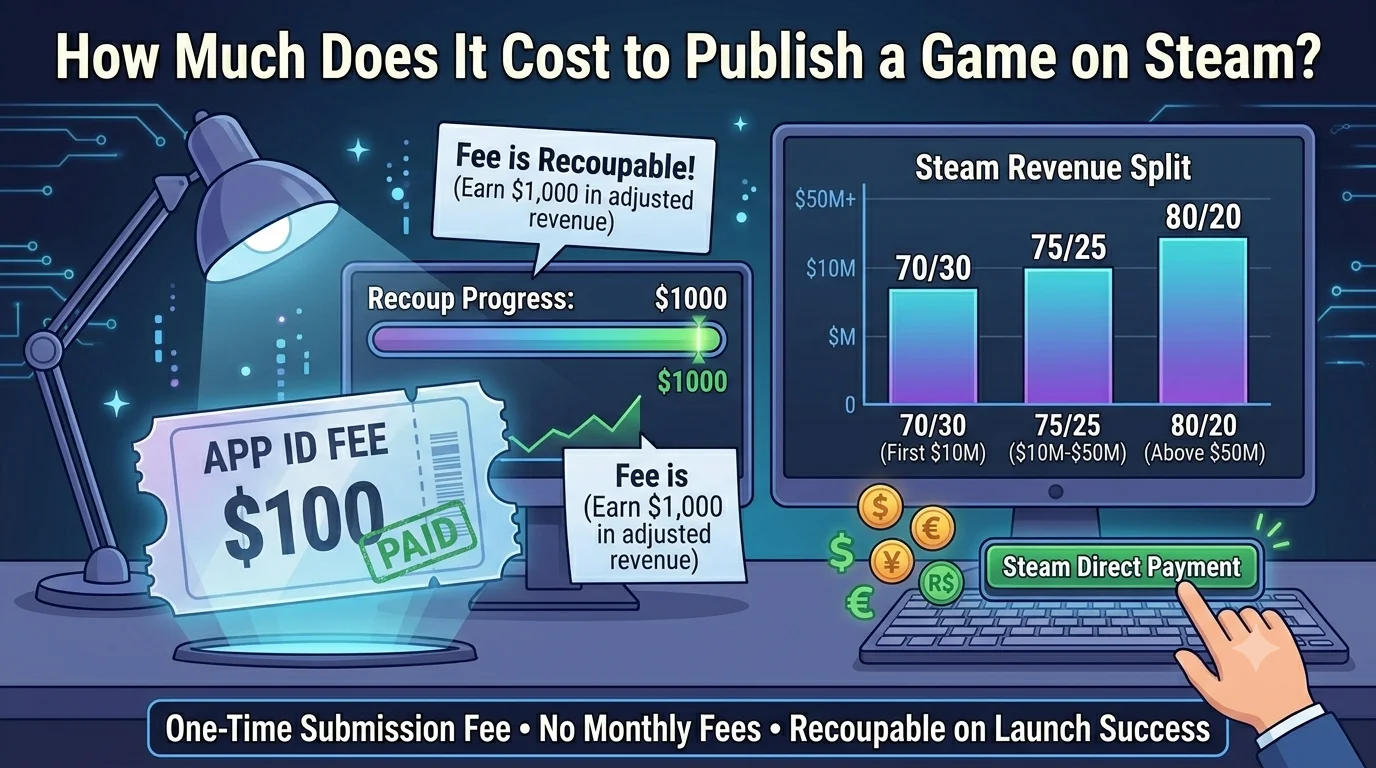
Steam charges a $100 fee per game through Steam Direct. This is a one-time payment made when you create a new app in Steamworks. It applies to each separate submission, so a standalone DLC or demo published as its own app needs its own $100 fee.
The fee is recoupable. Once your game earns $1,000 in adjusted gross revenue on Steam, Valve credits the $100 back automatically.
Beyond the $100, Steam takes 30% of every sale. You keep 70%. That split improves as your game earns more:
- 70% to you on the first $10 million in revenue
- 75% to you between $10 million and $50 million
- 80% to you above $50 million
There are no monthly fees, no minimum sales requirements, and no renewal costs.
How Long Does It Take to Publish a Game on Steam?
The full process from first signup to launch takes a minimum of 4 to 6 weeks.
After you pay the Steam Direct fee, there is a mandatory 30-day waiting period before you can release. Valve uses this time to verify your identity and confirm who they are working with. This cannot be shortened or skipped.
On top of that, your Coming Soon page needs to be publicly visible for at least two weeks before you release.
Once you submit your build for review, Valve's technical check typically takes 1 to 5 business days.
So the realistic minimum is around 5 to 6 weeks from account creation to launch day. In practice, most studios give themselves 3 to 4 months, which allows time to build up wishlists before going live.
Before You Touch Steamworks: Sort These Things First
The most common mistake we see studios make is that they jump into Steamworks before their game or their store assets are ready.
Sort these things out first.
Make Sure Your Game Is Actually Ready
A bad launch on Steam is hard to come back from. If your first wave of reviews says the game crashes or runs poorly, those reviews stay. And Steam's system will show your game to fewer people because of them.
Test your game on different computers, not just your own. If you can, get someone outside your team to test it. They will find problems you have learned to ignore.
Know What Makes Your Game Worth Playing
Before you write a single word about your game, be able to answer this in one sentence: what makes someone want to play it over everything else available?
That answer needs to come through in your trailer, your store page description, your artwork, and your tags. If it is not clear, players will click away without buying.
Get Your Store Assets Ready in Advance
You will need all of this before your store page can go live:
- Capsule art (the small thumbnail Steam shows everywhere, more on this below)
- Header image (460 by 215 pixels)
- At least 5 screenshots, ideally 8 to 10
- A gameplay trailer
- A short description (up to 300 characters)
- A longer description (Steam lets you use basic HTML here)
A quick word on capsule art specifically. This one gets ignored more than anything else. Your capsule is what players see when browsing discovery queues, search results, and recommendation lists. It sometimes displays as small as 150 by 69 pixels. If it looks cluttered or hard to read at that size, players will scroll past without ever clicking. Our creative services team builds capsule art and store visuals specifically for Steam, and we see the difference it makes to click rates firsthand.
Step-by-Step: How to Publish Your Game on Steam
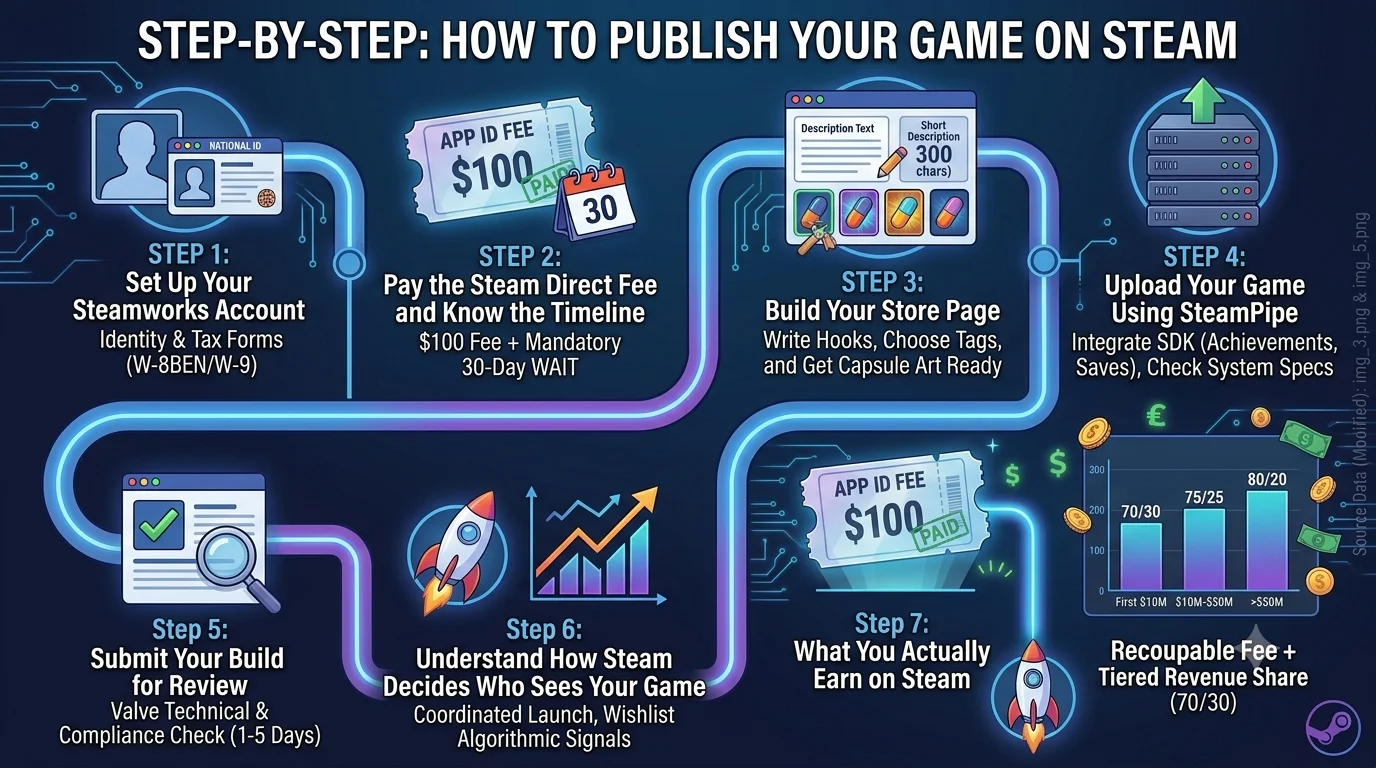
Step 1: Set Up Your Steamworks Account
Go to partner.steamgames.com and create an account. You will need to provide:
- Your email address
- Your name or company name
- Identity verification, usually a passport or national ID
- Your bank and tax details
The tax part is where people get surprised. If you are based outside the US, you will need to fill out a form called a W-8BEN. US developers fill out a W-9 instead. Steam guides you through this with a short questionnaire, but the process of verifying your tax ID can take up to 30 days in some cases.
Do this early. If you leave it until you are close to launching, it will push your date back.
Step 2: Pay the Steam Direct Fee and Know the Timeline
Steam charges $100 per game you submit. This applies to each separate submission, so DLC or a standalone demo each need their own fee.
Once your game earns $1,000 in sales on Steam, that $100 comes back to you automatically.
Now here is the part most guides leave out.
After you pay the fee, there is a mandatory 30-day wait before you can release your game. Steam uses that time to check your identity and confirm who they are working with. You cannot speed this up.
On top of that, you need a public Coming Soon page live on Steam for at least two weeks before you release.
So if you have a specific launch date in mind, you need to have everything set up at least six weeks before that date. That is the minimum. In reality, three to four months is a much better target if you want time to build up wishlists before you go live.
Step 3: Build Your Store Page
Your store page is doing a lot of work. It is the first thing a potential player sees, and most people decide within a few seconds whether to stick around or leave.
Write a Description That Hooks People
Do not start with your genre. Do not start with "In a world where..." Lead with what makes your game genuinely interesting or fun.
Your short description is especially important because it shows up in search results and recommendation widgets across Steam. Write it like a headline, not a summary.
For the longer description, keep it clear and easy to read. Use headers and short paragraphs. Most players read the top section and skim the rest, so put your best stuff up front.
Choose Your Tags Carefully
Tags are one of the main ways Steam decides who to show your game to. The first five tags you pick carry the most weight. Be accurate. Picking popular tags that do not really fit your game will bring in the wrong players, and those players will not buy or will leave negative reviews. Accurate tags bring better visitors who actually want what you are making.
Think About Pricing by Region
Steam lets you set different prices for different countries. The default tool converts your USD price into local currencies, but a direct conversion is not always what makes sense. If you think players in Brazil, Southeast Asia, or Eastern Europe are part of your audience, pricing at the straight conversion will often be too high for those markets. Have a think about where your players actually are before you set prices.
Get Your Coming Soon Page Up Early
Once your Steamworks account is ready, get that Coming Soon page live as soon as you can. Three to six months before launch is the sweet spot.
Every wishlist you collect before launch day is a potential sale on launch day. Steam looks at how fast you get sales in the first 48 hours and uses that to decide how much it promotes your game. More wishlists going in means more sales potential at launch, which means Steam shows your game to more people. It builds on itself.
Step 4: Upload Your Game Using SteamPipe
SteamPipe is the tool Steam uses to receive and deliver your game files. Once your account is active, you use it to upload your build, manage different versions (for example a beta and a main release), and push updates after launch.
The basics: you organise your game files into a folder structure, set up a build script, and run the SteamPipe client to upload. The Steamworks documentation explains this in full, and most major game engines like Unity, Unreal, and Godot have specific guides for packaging games for Steam.
Before you upload, check these off:
- Steamworks SDK: If you want achievements, cloud saves, leaderboards, or the Steam overlay to work in your game, the SDK needs to be integrated before you upload.
- Controller support: If your game works with a controller, setting it up through Steam Input makes the experience noticeably better for players.
- System requirements: Be honest about what hardware your game needs. If you overstate what it can run on, players with lower-end machines will leave bad reviews.
Step 5: Submit Your Build for Review
About 30 days before your planned release date, you submit your build to Valve for review. They check that the game actually launches, runs as expected, and meets Steam's technical requirements. They are not judging whether your game is good. It is a technical check.
Send a build that is as close to finished as possible. If it fails review, your timeline gets pushed back.
Also make sure your store page is fully filled out before you submit. Valve looks at the page as part of this process. Missing images or an incomplete description will cause problems.
Step 6: Understand How Steam Decides Who Sees Your Game
Steam does not just show every new game to everyone. It looks at signals to decide which games are worth promoting. The main ones are:
- What percentage of wishlists turn into purchases in the first 48 hours after launch
- How fast sales come in after launch
- How many reviews the game gets relative to copies sold
This means that launch day matters more than most people expect. A strong spike in sales on day one tells Steam there is real demand for your game. Steam then pushes it into discovery queues, recommendation carousels, and trending lists. That visibility brings more sales, which brings more visibility. The system builds on itself when you give it the right signal at the start.
This is why pre-launch work matters so much. Building wishlists, running a demo, growing a community before launch. It is not just marketing. It is loading the spring before you release it.
For a full breakdown of how to plan your launch window, our game launch marketing checklist for PC and Steam goes through the whole system.
Steam Next Fest
If your game is not ready to launch yet but is playable in some form, Steam Next Fest is worth knowing about. It is a regular event where games with demos get a big boost in visibility across the platform. Studios that go in well-prepared with a solid demo and a clear hook can pick up a lot of wishlists in a short window.
You need to submit a demo and meet Valve's criteria to take part, so plan for it two to three months ahead. It is one of the better opportunities Steam gives developers before launch.
Step 7: What You Actually Earn on Steam
Steam takes 30% of your revenue, and you keep 70%. That ratio improves once you hit higher revenue thresholds:
- 70% to you on the first $10 million
- 75% to you between $10 million and $50 million
- 80% to you above $50 million
For most studios, the 70/30 split is what applies. This is in line with what Apple and Google take on their app stores, and it is a better deal than most traditional publishing contracts.
Steam pays you monthly once you clear the payment threshold, which is usually $100. Payments go via bank transfer, and tax withholding depends on your country's tax agreement with the US.
After Launch: Keeping the Momentum Going
Publishing is the start, not the finish.
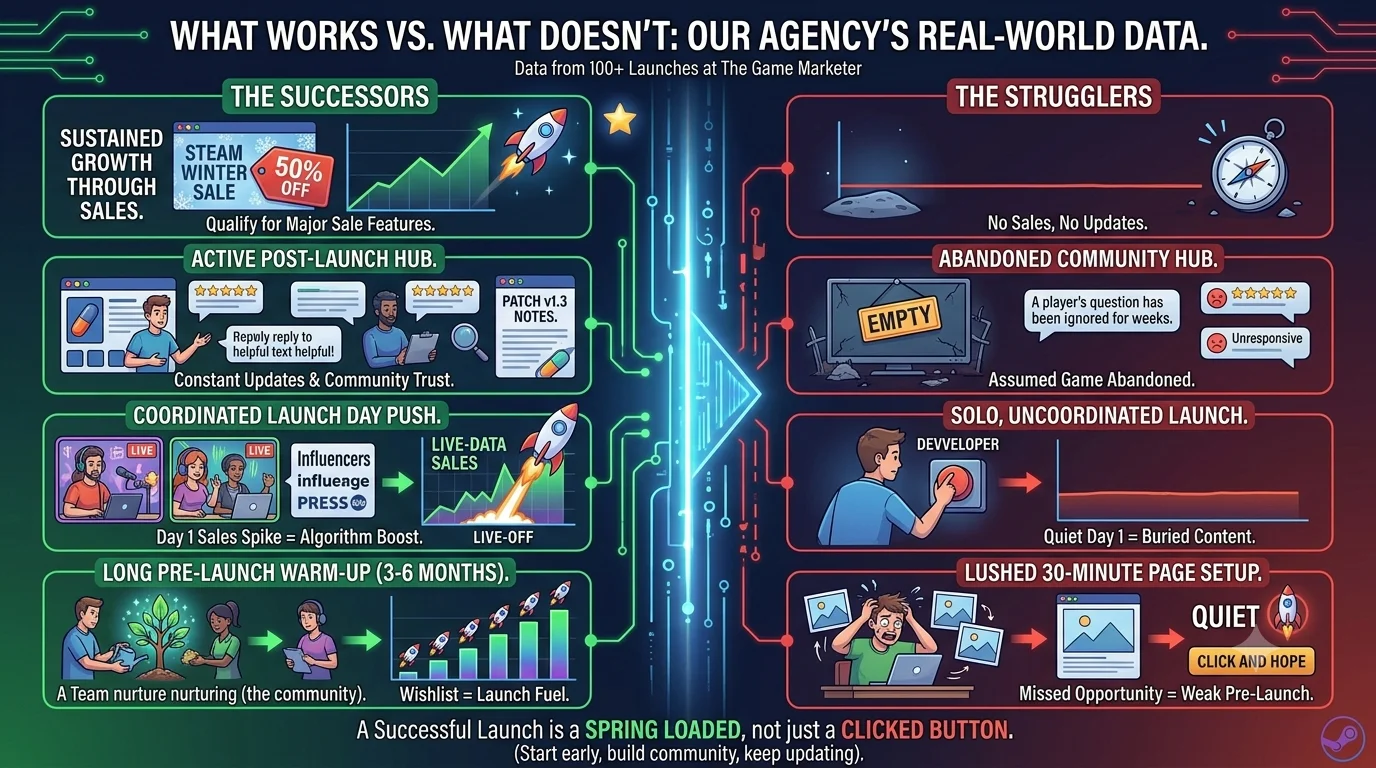
Read and respond to reviews. Both positive and negative ones. People who are thinking about buying your game read how developers respond to criticism. A calm, helpful reply to a bad review often does more for your reputation than the review itself damages it.
Keep updating the game. Steam surfaces games that stay active. Even small updates with patch notes tell the platform and your players that you are still working on it.
Join Steam sales. Seasonal sales like the Steam Summer Sale and Winter Sale come with real visibility boosts for games that participate with a decent discount. Most studios do best with 33 to 50 percent off once they are past the launch window. You need at least 20 percent off to qualify for most Steam sale features.
Stay active in your community hub. If players post questions and nobody answers, potential buyers see that and assume the developer has abandoned the game. Check in regularly. It takes ten minutes and it matters.
What We Have Actually Seen Working (And What Does Not)
We have helped launch over 100 games at The Game Marketer, working with studios of all sizes from first-timers to established publishers. You can see some of those campaigns on our case studies page. Here is what stands out from doing this repeatedly.
The Coming Soon page is the most wasted opportunity on Steam. Studios spend weeks getting their trailer right and then spend thirty minutes setting up the store page. They launch with a few hundred wishlists and are confused when day one is quiet. The store page is not a box you tick. It is the main tool you have for building an audience before launch. Start it early and keep improving it.
Capsule art moves the needle more than most studios expect. We have seen games with great trailers underperform because the capsule looked generic next to everything else on the page. We have also seen the opposite, a simple clear capsule that immediately communicated what the game was, and the click rate was noticeably higher. If you are deciding where to spend creative budget, put serious thought into this one. Our creative services team handles this regularly.
The 30-day wait is not negotiable. Several studios have contacted us after assuming they could set up and launch within two weeks. They could not. Plan your timeline correctly from the start.
Steam Next Fest is genuinely valuable. We have seen studios pick up tens of thousands of wishlists in a single Next Fest week with a playable demo and a clear pitch. If you are pre-launch and can build a demo, put this event on your calendar.
Launch day needs to be coordinated. Studios that do well on Steam do not just hit publish and hope. They line up creator coverage, community posts, and press coverage to all go out in the same window. That concentrated activity tells Steam there is demand. Our influencer marketing and video game PR teams work together to build exactly this kind of coordinated push for launch day.
We also built a free interactive version of this checklist, which you can work through step by step. Use the free Steam Launch Checklist here.
Frequently Asked Questions
Can anyone publish a game on Steam?
Yes. There is no invite system and no vote-based approval. Any developer or studio can publish on Steam through Steam Direct by paying the $100 fee, completing identity and tax verification, and passing Valve's technical review.
How much does it cost to publish a game on Steam?
The upfront cost is $100 per game. This is recouped once your game earns $1,000 in revenue. Beyond that, Steam takes 30% of every sale. There are no monthly fees or annual costs.
How long does the Steam publishing process take?
The minimum is around 4 to 6 weeks from account creation to launch. The 30-day waiting period after paying the fee is the main bottleneck. Most studios plan for 3 to 4 months to allow time to build wishlists before going live.
Does Steam review every game before it goes live?
Yes. Valve reviews your game build and store page before you can release. The review checks that the game runs correctly and the store page is complete and accurate. It is a technical and compliance check, not a quality judgement. Reviews typically take 1 to 5 business days.
What percentage does Steam take from sales?
Steam takes 30% on the first $10 million in revenue. The split improves to 25% on earnings between $10 million and $50 million, and 20% above $50 million. For most studios, the 70/30 split is what applies.
Do I need a publisher to get on Steam?
No. Steam Direct lets any developer publish independently without a publisher. That said, a publisher can help with marketing, localization, and audience building, which are often bigger challenges than the publishing process itself.
What is the Steam Direct fee used for?
Valve introduced the fee to reduce spam and low-effort uploads while keeping Steam open to all developers. It is refunded once your game earns $1,000.
When should I set up my Coming Soon page?
As early as possible. 3 to 6 months before launch is the target. The Coming Soon page lets players wishlist your game, and those wishlists convert to sales on launch day. The more wishlists you have going in, the stronger your launch-day signal to Steam's algorithm.
What is Steam Next Fest and should I participate?
Steam Next Fest is a platform-wide event where games with demos get extra visibility across Steam. It runs several times a year. If your game is not yet ready to launch, participating with a demo can generate thousands of wishlists in a short window. Plan to participate 2 to 3 months ahead of the event.
A Few Final Words
Getting your game on Steam is not complicated. The fee is low, the process is clear, and Valve gives you the tools you need. What separates games that find their audience from games that get buried is the work that happens before, during, and after you hit the release button.
Plan your timeline properly. Build your Coming Soon page early. Work on your wishlist before you need it. And treat launch day as something you prepare for, not just something you click through.
If you want a second pair of eyes on your store page, your launch timing, or your overall approach, we are happy to talk. No pressure, just a conversation about your game.
The Game Marketer is a video game marketing agency working with developers, studios, and publishers on PC, console, and mobile. We have launched over 100 games and generated over 40 million installs. If you are heading into a Steam launch and want a plan that fits how the platform actually works.