
Most game Discord servers are dead within a month. Here is why, and how to make sure yours is not.
You create the server. You post the link in your Steam page bio. A few hundred curious players join. And then... silence. A couple of messages in #general, a bug report nobody responds to, and then nothing. The members mute the server and forget it exists.
We have seen this play out with indie studios and well-resourced publishers alike. And in almost every case, the game is not the problem. The problem is that the server was treated as a box to tick rather than a place worth showing up to.
A properly run Discord game community does things that no other platform can. It keeps players invested between updates, turns feedback into development decisions, and creates the kind of word-of-mouth that paid media cannot buy. The majority of breakout games in the last few years, from indie sleeper hits to big-budget launches, had an active Discord server running months before release. It is not a nice-to-have anymore.
This is a practical guide to how to build a game community on Discord that actually holds people, written from the perspective of a team that does this work with studios every week. No filler. Just what works.
Before anything else: Discord is a conversation, not a broadcast channel
This is the most important thing to understand before you touch a single setting.
A lot of studios set up a server and immediately treat it like a news feed. Announcements go out. Patch notes get posted. Then they wait for game community engagement that never arrives.
Discord does not work that way. The moment your server starts feeling like a press release machine, players drift. What keeps people coming back is the feeling that something is actually happening there. Developers present. Other players talking. Being there feels worth it.
That mindset shapes every decision in this guide.
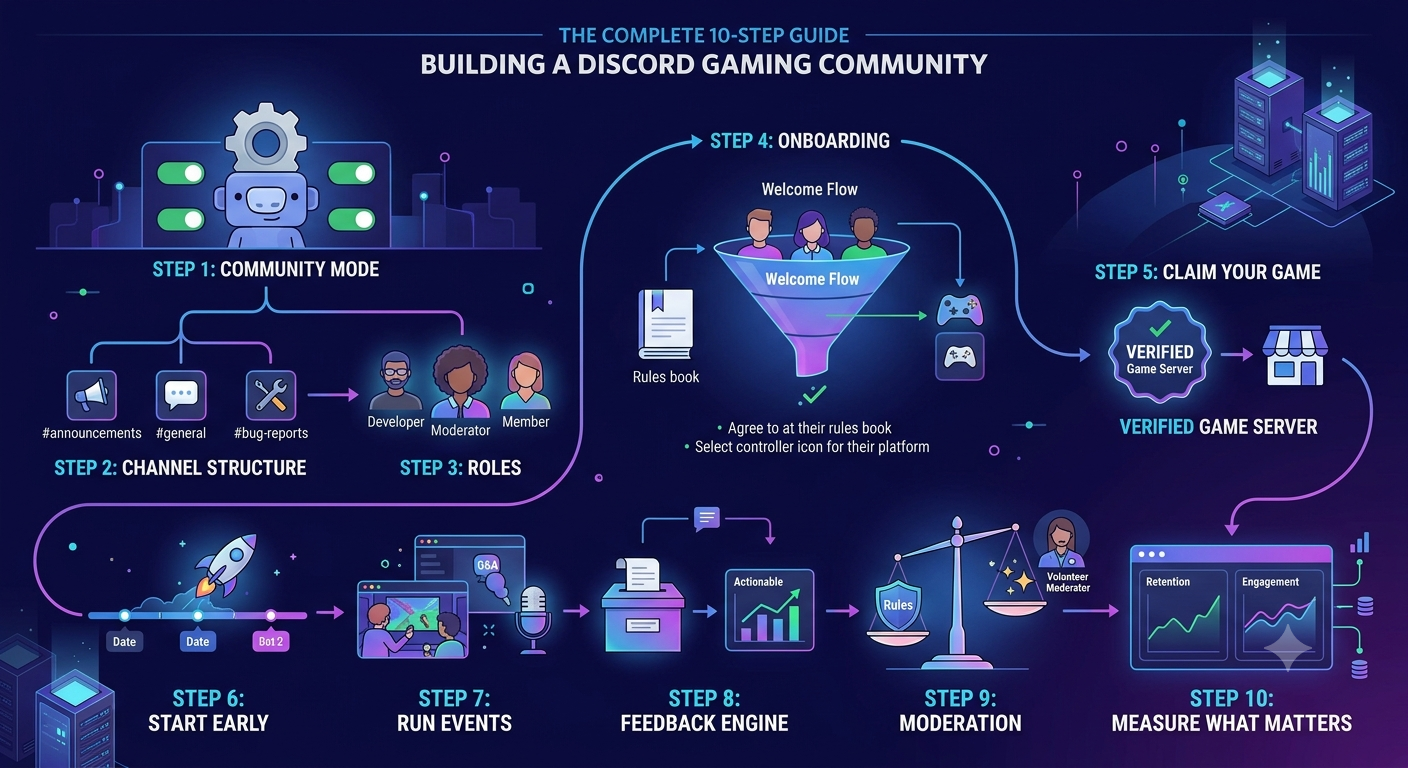
Discord game community setup steps showing channel structure roles and onboarding for video game developers
Step 1: Create the server and turn on Community mode
Create a new server on Discord, then go straight to Server Settings and enable the Community feature. This is not optional. Without it, your server is invisible to anyone who does not already have your direct link.
Enabling Community mode unlocks four things that genuinely matter for gaming community management:
Announcement Channels let members subscribe and receive your posts in their own servers. Free organic reach, built in.
Community Onboarding guides new members through a proper welcome flow so they land somewhere useful, not a confusing wall of channels.
Server Discoverability is how players find your Discord server for games organically when they search for your title. Without this switched on, you simply do not appear.
Server Insights gives you engagement and retention data once you pass 500 members. Think of it as your community analytics dashboard. More on this in Step 10.
Once Community mode is live, give the server a proper name (your game title), add a clear icon and banner, and write a description that actually says something. Not "the official community for [Game Name]." Tell players what kind of conversations happen here, who is in the server, and what they get by joining. That description is the difference between someone clicking Join and someone scrolling past.
Step 2: Build the channel structure players can actually navigate
Here is a mistake we see constantly: a studio opens their Discord game community with 25 channels and 50 members. It looks like a ghost town. Every empty channel signals that nobody is home.
Start lean. Here is the structure we recommend for most games at launch:
INFO (read-only)
- #announcements
- #patch-notes
- #rules
COMMUNITY
- #general
- #introduce-yourself
- #media-and-clips
GAME
- #gameplay-tips
- #bug-reports
- #feedback-and-suggestions
VOICE
- General
- Game Sessions
Twelve channels. Nothing more until you can see members filling them up.
What you leave out matters as much as what you include. No #memes channel. No #rants. No #off-topic. These dilute the focus before you have any momentum. Add them later if the community actually asks for them.
One small thing worth doing right: make #announcements an official Discord Announcement Channel rather than a regular text channel. Members can subscribe, and your posts distribute to other servers automatically. It is free distribution that most studios completely ignore when thinking about game community engagement.
Step 3: Set up roles before you open the doors
Roles do two things. They control what people can see and do, and they give members something to earn. Both matter for gaming community management at scale.
Moderator: Full moderation permissions, not admin. Keep admin restricted to the minimum number of team accounts.
Developer / Team: When a player sees a dev tag next to a name in general chat, the whole tone of the server shifts. It signals that real people from the studio are in there. This single detail does more for community trust than any number of polished announcements. Players stop feeling like they are shouting into a void.
Member: Auto-assigned after onboarding. Require new users to read the rules and answer one question before this unlocks. It filters bots and people who are not genuinely interested without adding friction for the ones who are.
Keep the total role count manageable. A sidebar listing 40 roles reads as chaotic. Ten well-defined roles is the sweet spot for most Discord server for games setups.
Step 4: Set up onboarding properly
Discord's Community Onboarding is a new member's first five minutes with your server. Most studios set it up badly by making it too long.
Fewer steps equals better results. According to Discord's own developer documentation, every additional step in onboarding is a chance for someone to drop off before they have had a single real interaction. Two steps is the target: agree to the rules, choose a platform role (PC, Console, Mobile). Done.
Do not make someone answer five questions or read a 500-word rules document before they can say hello. They are here because they are interested in your game. Get them into the conversation quickly.
For AutoMod, turn on Discord's built-in filtering before you open to a wider audience. Keyword filtering, anti-spam for new accounts, and member screening handle the basics without needing a paid bot. MEE6, Dyno, and Carl-bot are solid additions later, but the built-in tools are enough on day one.
Step 5: Claim your game on Discord (most studios miss this)
This feature is genuinely underused and the impact is significant.
Discord's Claim Your Game feature links your official server directly to your game's listing on the platform. When players search for your game inside Discord, they see your official Discord game community as the verified destination. Not a random fan server. Not nothing. You.
Claimed games also unlock Community Invites, which let you embed a direct Discord link inside the game itself. Every player who loads your game sees the invite without you running a single separate campaign to drive it.
To do it, go to the Discord Developer Portal, create or locate your application, and follow the Claim Your Game process. You need a properly configured Community server to qualify, but if you have followed Steps 1 through 4, you are already there.
If you are mapping out how how to build a game community on Discord fits into your full release strategy, our game launch marketing checklist for PC and Steam covers exactly where to slot community work in the timeline.
Step 6: Start the server before the game comes out
This is where most studios make their biggest mistake. They wait until launch day to think about community, then wonder why the server is quiet exactly when the game is getting its most attention.
Start 3 to 6 months before launch.
Here is why. The conversations that happen in a server's first few weeks set the tone for everything that follows. If you only have developers and a handful of beta testers in that period, you get to shape what kind of game community engagement looks like in your server. What people talk about. What the vibe is. What is and is not acceptable.
By launch day, you want the server already feeling alive. A player who joins and sees hundreds of people chatting is far more likely to stay than one who joins a server with 12 members and nothing happening.
Ways to build that early audience:
Beta and playtest invites. Every tester gets a Discord link as part of their onboarding. These are your most invested early players. Use them.
Steam store page. Put the Discord link in your description, in developer update posts, and in your forum signature. Players who wishlist are already interested.
Social content. Short dev update clips, behind-the-scenes posts, and screenshots shared to Reddit or TikTok with a Discord link in the caption turn casual viewers into server members. Our guide on innovative social media strategies for gaming brands covers how to make that content reach beyond your existing audience.
We saw this play out with Domain, a card game we worked on. Driving players into the Discord early became one of the clearest levers for retention. It boosted the community feel of the game and led to weekly tournaments that became a regular fixture players looked forward to.
Step 7: Run events that give people a reason to return
Static servers decay. Members join, check the channels for a few days, mute everything, and drift. Events are what interrupt that pattern.
The events that work best are specific, repeatable, and easy to participate in. Not elaborate. Easy.
Weekly game sessions: Same time, same voice channel, every week. Consistency matters more than novelty. After a few weeks, members start planning around it. Studios we have worked with, including teams in the indie space, have found this to be one of the highest-return community actions they run. It costs nothing and it compounds over time.
Screenshot and clip challenges: Ask for the best clip from a specific situation in your game. Best submission earns a Community Pick role or a small in-game reward. The team also gets a week's worth of shareable social content without any additional effort.
Monthly developer Q&A : Bringing a developer into a voice channel or using Discord's Stage feature for a monthly Q&A is one of the highest-trust activities a studio can run. Players feel like they are part of the process rather than just an audience waiting for the next patch. We have run these with clients across genres and the response is consistent: players show up, they stay, and they talk about it afterwards.
Tournament or challenge weeks: If there is any competitive element to your game, structure it. Even casual games can run a best-time or highest-score week where players submit results and compete for bragging rights.
Use Discord's Scheduled Events feature for all of these. It sends automatic notifications, lets members mark themselves as interested, and gives you a real sense of anticipated turnout before the event happens.
Our piece on user acquisition vs user retention explains why keeping existing players engaged often delivers more return than acquiring new ones.
Step 8: Use the community as a feedback engine
This is where a well-run Discord server for games earns back far more than the time put into it.
Your most active Discord members are the players who care most about your game. Every suggestion, complaint, and question they post is a data point you would otherwise pay significant money to collect through a focus group or research panel. And it is arriving in real time, from people who are actually playing.
Pin a feedback template in your #feedback-and-suggestions channel. Ask members to say what they want, why it would improve the experience, and what they would trade for it. A mechanic change, a balance adjustment. This makes their input actionable rather than just venting.
Then close the loop publicly. When you act on something the community asked for, say so in #announcements and credit the community. We have seen this play out with studios whose servers had been quiet for weeks suddenly come back to life after one honest "you asked for this, here it is" post. Players who see their suggestions make it into the game bring friends. They defend the game when others criticise it. That effect is real and it is consistently underestimated.
We also use Discord to run structured playtests with clients, giving specific builds to a gated channel of volunteer testers before wider release. The feedback quality from invested community members consistently outperforms generic beta programmes, and it costs nothing to set up using Discord roles and channel permissions.
Our guide on targeting the right players for your game covers how to identify and keep the players who generate this kind of value.
Step 9: Moderate without killing the vibe
Under-moderated servers go toxic and drive away the majority of players who just want a respectful space. Over-moderated servers feel corporate and drive away everyone else. Finding the line is genuinely difficult and it requires ongoing judgement, not just a rules document.
A few things that hold up well across different community sizes:
Handle rule breaks quickly and quietly: A public warning that escalates into a visible argument does more damage than the original incident. Timeout first, DM an explanation, move on. Keep the drama off the main channels.
Never delete feedback you disagree with: If a player has a real complaint posted respectfully, let it stand and respond honestly. Deleting it will get noticed, screenshotted, and shared. Engaging with it builds far more goodwill.
Recruit veteran members as volunteer moderators: Recruit veteran members as volunteer moderators. Players who have been in your server for months understand the culture better than any new hire. Give them proper tools and visible recognition. A well-supported volunteer mod team is what separates Discord game communities that scale from ones that collapse under their own growth. We have watched servers with 50,000 members run smoothly on three volunteer mods because the culture was set up right early on.
Get members involved in setting the tone: A pinned post in the first week asking "what kind of community do you want this to be?" goes a long way. People self-police a culture they helped build.
More on how moderation connects to overall gaming community management in our post on building a strong gaming community on social media.
Step 10: Measure what is actually happening
Once you hit 500 members, Discord Server Insights gives you real data. Here is what to look at:
Weekly communicators: This is your actual active community size, not your total member count. Most servers sit between 3 and 10 percent of total members sending at least one message per week. Below 3 percent and your game community engagement strategy needs work. Above 10 percent and something is working well, understand what and do more of it.
7-day and 30-day member retention: What percentage of new members are still in the server a week and a month later? Low 7-day retention points to a weak first-week experience. A sharp drop between week one and month one usually means events are not consistent enough to bring people back.
Most-used channels: This tells you what your community actually wants to talk about versus what you assumed they would want when you built the channel structure. We have worked with servers where #feedback-and-suggestions was consistently busier than #general. That is a strong signal about who your members are and what they need from the team.
Beyond Discord's native analytics, track the correlation between server activity and your in-game retention numbers. In our work with studios, there is a consistent pattern: when the Discord game community is healthy, DAU and 30-day game retention track upward alongside it. The community is quietly doing work that ad spend cannot replicate.
For our clients, we track the correlation between server activity and in-game retention numbers across the studios we work with. The pattern is consistent: when the Discord game community is healthy, DAU and 30-day game retention track upward alongside it. The community is quietly doing work that ad spend cannot replicate.
Our post on mobile game marketing strategies covers how community performance fits into the broader marketing numbers picture.
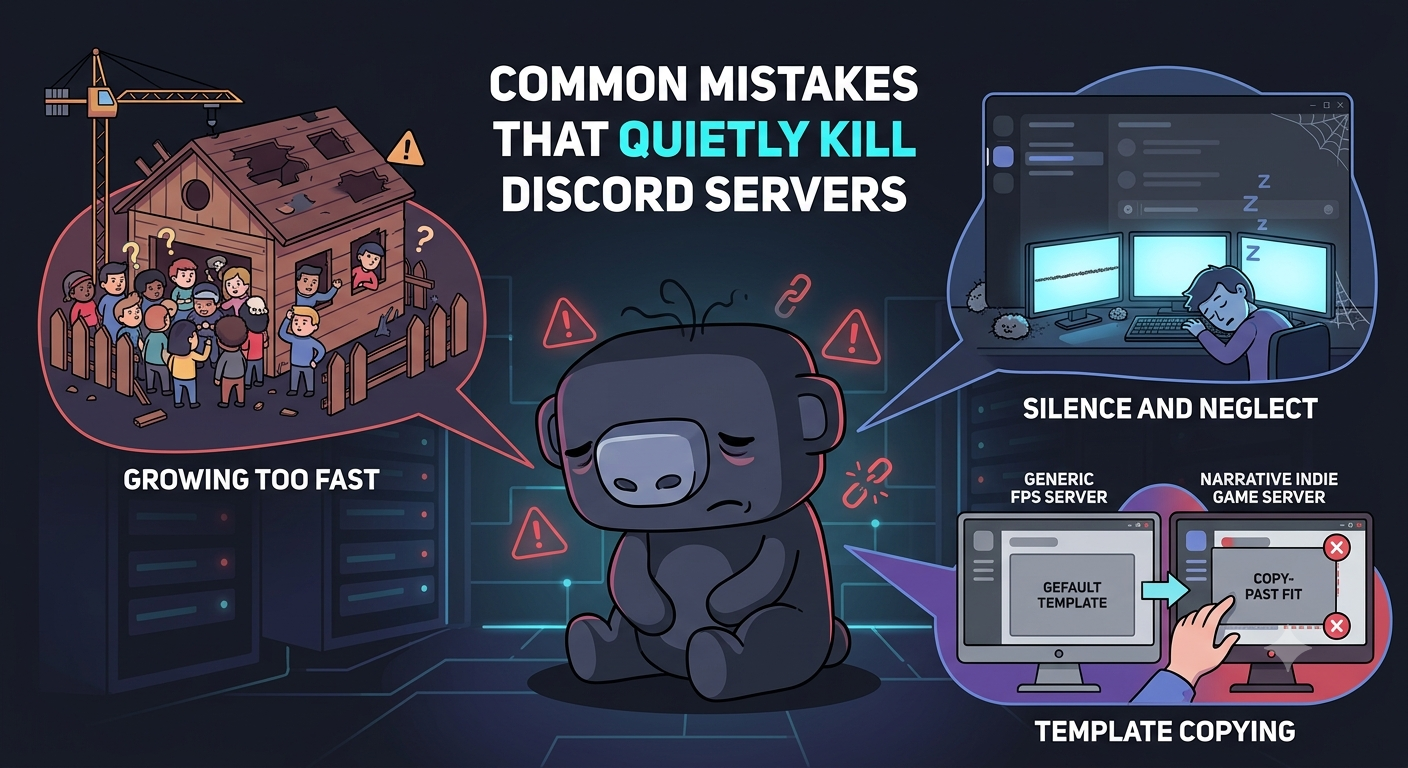
Common mistakes that kill Discord game community servers including going quiet and poor channel structure
Common mistakes that quietly kill Discord servers
A few patterns worth flagging because they come up constantly:
Growing the member count before the server is ready: Driving players to a half-built server sets a first impression that is very hard to recover from. Build the structure, soft-launch with a small group, get the culture right, then scale.
Going quiet for two weeks: Silence kills momentum faster than anything. Even small team interactions, responding to a funny clip, running a quick poll about a mechanic, keep the server feeling alive. Members notice when developers disappear.
Copying another game's structure wholesale: A competitive shooter community is structured completely differently from a cosy simulation game. What works for Valorant's gaming community management will not work for a narrative indie. Your server should feel like an extension of your game's identity, not a template you found online.
A card game community and a sports management community do not run the same way. We saw this with Domain and Cricket Manager Pro 2022, two very different Discord communities we built from the ground up. What worked for Domain's card-focused audience, tournament structure, card explainer content, did not map onto Cricket Manager Pro's community, where the focus was on test launch feedback and beta recruitment. Structure follows the game, not the other way round.
We've been doing this for a while. Here is what we know
After years of working with studios across every genre, platform, and budget level, one conclusion stands above all others: communities are not built during launch, they are revealed by it.
The teams that invest early in genuine player relationships consistently enter launch with momentum, trust, and resilience that money alone cannot buy. A Discord server is not valuable because it exists. It is valuable because it reflects the strength of the connection between a studio and its players.
The studios that treat community as a core part of the product, rather than an afterthought of marketing, are the ones that build games people stay with long after launch day.
We saw this exact pattern play out with Wicket Gaming AB on Cricket Manager Pro 2022. We built the Discord from the ground up, paired it with a paid media push to drive the right players into the server, and used it to recruit beta testers ahead of the test launch. The studio walked away with real player data they could act on, not just a member count.
Frequently Asked Questions
Q. How many members do you need before a Discord server feels active?
Ans. Somewhere between 200 and 500 engaged members is where most Discord server for games setups start to feel self-sustaining. Total member count is the wrong metric. Weekly communicators is what matters. A server with 300 people posting regularly is more valuable than one with 5,000 who have all muted it.
Q. Should I start the Discord before the game launches?
Ans. Yes. Ideally 3 to 6 months before launch. Early members shape the culture of the Discord game community, generate pre-launch word of mouth, and create a live feedback channel while development decisions can still be influenced by what players are saying.
Q. What bots do game servers actually need?
Ans. Start with Discord's built-in AutoMod. Add MEE6 or Dyno if you want a levelling system or tighter auto-moderation controls. Carl-bot is solid for advanced role management. More than three or four bots and the server starts to feel like a dashboard rather than a community.
Q. How do you keep the server active between game updates?
Ans. Events are the answer for sustained game community engagement. A predictable weekly game session or community challenge gives members a reason to return even when there is nothing new to announce. Community content spotlights, where you highlight member-made guides, clips, or fan art, are also low effort for the team and consistently generate activity.
Q. Does Discord actually improve player retention?
Ans. Yes, consistently. Players who join your Discord game community have social investment tied to the game. Friends, inside jokes, shared history. Social investment is one of the strongest retention drivers in gaming and it is very difficult to replicate through any other marketing channel.
Q. Can Discord replace a game forum?
Ans. For most games in 2026, yes. Discord is faster, more engaging, and easier to moderate than traditional forum software. If your game has a deep modding community or produces content players will search for years later, consider keeping a forum for archivable long-form resources while using Discord for the live day-to-day gaming community management layer.
Final thought
Building a game community on Discord is not a launch-week task. It is a sustained commitment that starts during development and pays dividends long after the game ships.
The studios that get it right treat gaming community management as part of the product, not an afterthought. They build the structure properly, show up consistently, close the feedback loop, and measure what is actually happening. The ones who do get something paid media cannot buy: a player base that advocates for the game, flags problems early, and sticks around.
If you want to build a game community engagement strategy that actually fits your game and your audience, we work with studios at every stage to get this right. Take a look at how we approach it, or get in touch and we can talk through where you are.